Salsify · 2025 · Product Experience Mgmt (PXM) · AI
Cutting publishing time to Kroger with AI-assisted review and validation.
At Salsify, my team owned the AI Feedback Report flow for Kroger, built on Angie, Salsify’s shared AI capability. As the solo design lead, I designed how customers validate products before they publish and how they resolve Kroger’s feedback afterwards. The key UX consideration was how much the agent should do on its own. Spelling errors are corrected automatically, and higher-impact fixes wait for the customer to accept them. The flow shipped in 2025.
- ~93%
- reduction in manual review load
- Solo
- Design lead
- 8 mo
- On the project
- 2025
- Shipped
- Role
- Senior Product Designer · Solo design lead
- Team
- 1 PM · 1 EM · Engineering
- Tags
- AI features · PXM · Enterprise SaaS
When product content breaks Kroger's quality and style standards, the product is rejected, ranked lower in search or sent back for manual review. The AI Feedback Report flow helps Salsify's customers catch those issues before they publish and resolve Kroger's feedback once their products are live.
The problem
Kroger’s feedback reached customers slowly and with little context.
Kroger has detailed quality and style standards for the products on its digital shelf, covering naming conventions, claim restrictions, attribute requirements, formatting rules and prohibited language. The standards keep the catalogue searchable and consistent across thousands of categories, and they are extensive enough that customers regularly publish content that breaks them, often by mistake.
Before this flow, resolving a violation involved several handoffs. Kroger's QA process flagged the issue, Salsify's dedicated Kroger QA review team triaged it, and the feedback went back to the customer to fix and republish. Each handoff added delay, and for customers publishing thousands of products, those delays held up how quickly products reached the digital shelf.
Scope
Angie was a shared AI capability, and each team owned its own feature.
Salsify is a product experience management (PXM) platform that brands use to publish product content to retailers. Angie is the name of Salsify's shared AI capability. Each product team built and owned its own features on top of it, and my team owned the AI Feedback Report flow for Kroger. The flow covers two moments in a customer's work: validating products before they are sent to Kroger, and understanding and resolving Kroger's feedback once products are live.
I was the solo design lead on the flow, working with a product manager and an engineering manager.
“The most important UX decision was how much the agent should do on its own, and the answer depended on the impact of each fix.”
Research
Understanding why customers would adopt an AI validator.
Salsify spans two connected categories. Product information management (PIM) is where brands store and govern their product data, and product experience management (PXM) is where that data is shaped and published to retailers. The research had to account for both: products being imported into the PIM for the first time, and products already in the PIM that were being prepared for Kroger.
Value mapping workshop
The team ran a value mapping workshop to understand the value an AI validator would create for customers, and the use cases that would drive its adoption. The board was organised around five questions, each answered separately for brands and for retailers: who would use a QA validation tool, what they are trying to achieve, what they struggle with, what solutions they are seeking, and how we would know their challenges were solved.
The workshop was a way of building empathy with customers and understanding the nuances of their pain points, including how they were solving the problem at the time. The final question defined the success metrics. Enterprise customers often keep using a product because they are locked into a suite with no real alternative, so usage alone would not show that the validator was valuable. The success metrics had to show that customers adopted it because it solved an acute problem for them.

Comparing human review with AI review
Product, engineering and design also worked through the manual feedback reports from Salsify's Kroger QA review team, to understand the most common error types and which issues a human reviewer could detect that an AI model could not.
The team then ran a side-by-side comparison. One batch of products went through the QA team's existing review, and a second batch was reviewed by the AI in the background. Comparing the two showed where the AI hallucinated, where it caught errors that human reviewers had missed, and where it reviewed products with a faster turnaround. Those findings shaped how the agent was configured.
Mapping the validator flow
The user flow mapped the two routes customers take into the AI validator. A new validation starts with importing a CSV, mapping products to Salsify's attributes, running the validation and viewing a report that separates successful products from failed ones. Existing validation reports let customers return to earlier results, search and filter them, open product details and read the error message for each failed product. Both routes end in the same export options.
Constraints
Four constraints that shaped the design.
- Salsify's Feedback Status Report was already central to customer workflows. Redesigning the surrounding UI was out of scope, so the flow had to fit into screens that customers already knew.
- Kroger's style guide is detailed and enforceable. The AI had to apply it accurately, or it would lose customers' trust by the second use.
- Automatic fixes carry risk. An incorrect change to a brand claim could put the customer's reputation at risk, and Salsify's with it, so the agent's level of autonomy had to depend on the impact of each change.
- Customers vary widely in technical fluency. Some are enterprise commerce teams with merchandising operations experience, and others are small CPG teams new to the platform. The UI had to work for both groups without oversimplifying for either.
Deliberate opt-in
Customers chose when to use AI.
In 2025, many companies were still defining their AI policies, and new models were arriving every few months. Some Salsify customers were cautious about AI being applied to their product content. For that reason, Angie never ran automatically. Customers could turn it on or off under Settings, and each use started with a deliberate choice, such as selecting Validate with Angie on the Products page or opening the Angie panel on the Feedback Status Report.
Customers' jobs to be done were not linear either, because each company uses Salsify with its own workflows. The flow therefore offers several starting points, each tied to what is on screen: validating a file before import, explaining a selected feedback item, finding the feedback that blocks publishing and troubleshooting a rejected product.
The key UX consideration
Deciding how much the agent should do on its own.
The most important consideration in configuring the agent was how it should act on the errors it found. The team weighed three models.
Auto-fix
Angie resolves an error as soon as it detects it, so customers move fastest. The trade-off is control, because a wrong fix to a high-impact attribute would change a customer's content without their knowledge.
Warn
Angie flags the error and leaves the content unchanged. Warnings are safe, but they still create friction and a bottleneck in the flow, because they signal a problem without giving the customer enough information to resolve it.
Suggest
Angie flags the error, explains it and proposes a fix for the customer to accept. This model offered the right balance. Some errors are non-blocking, which means the product can still be published while they are open, so a suggestion lets the customer decide when to act without holding up the rest of the catalogue.
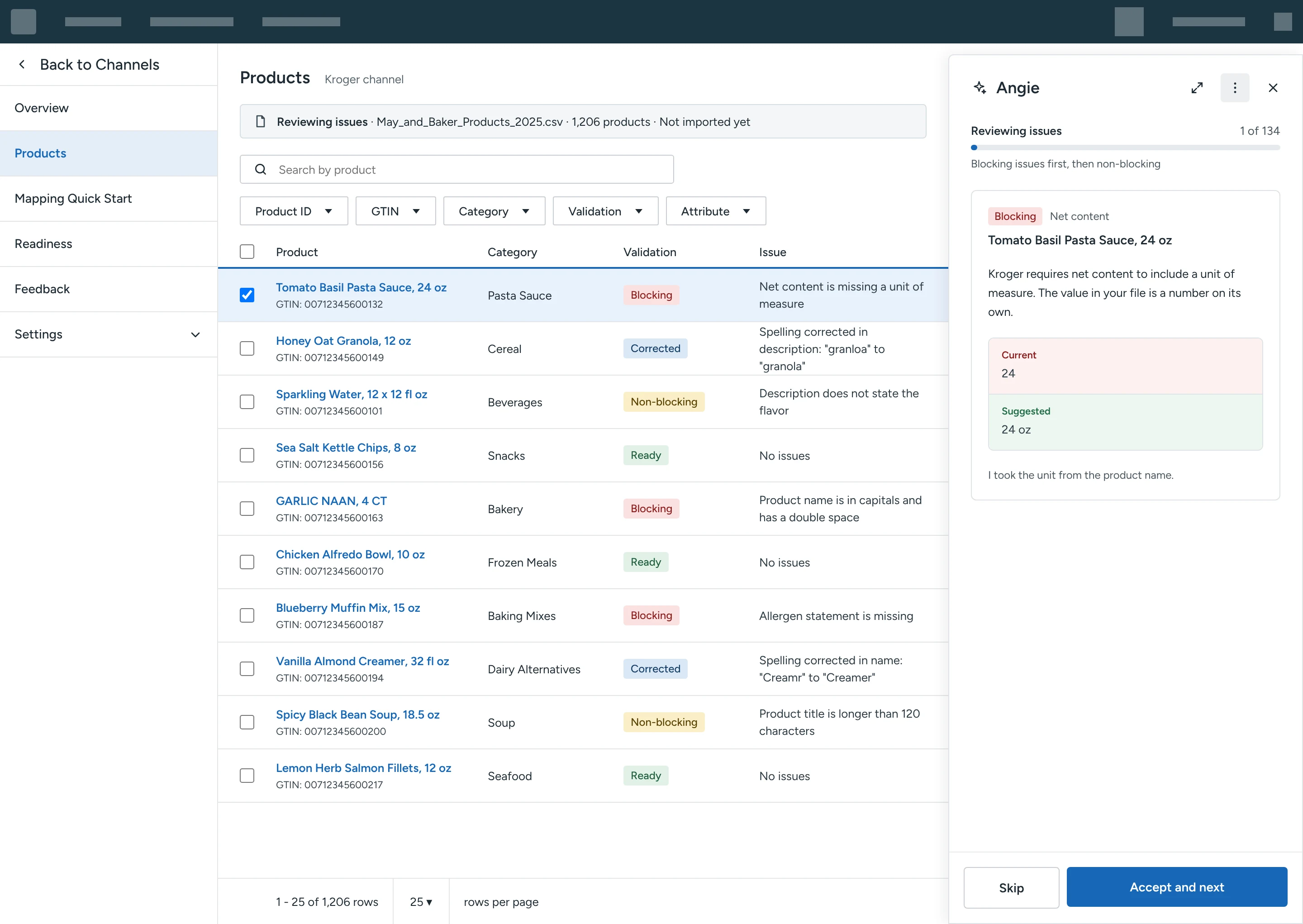
The shipped flow combines two of these models. Spelling errors are corrected automatically, because the correct answer is unambiguous and the risk is low. Higher-impact fixes use Accept and resolve, so the customer stays the author of their own content.
The flow
From an empty catalogue to resolved retailer feedback.
The screens below are recreated for this case study with sample products, so that each part of the flow can be shown clearly.
Validating products before import
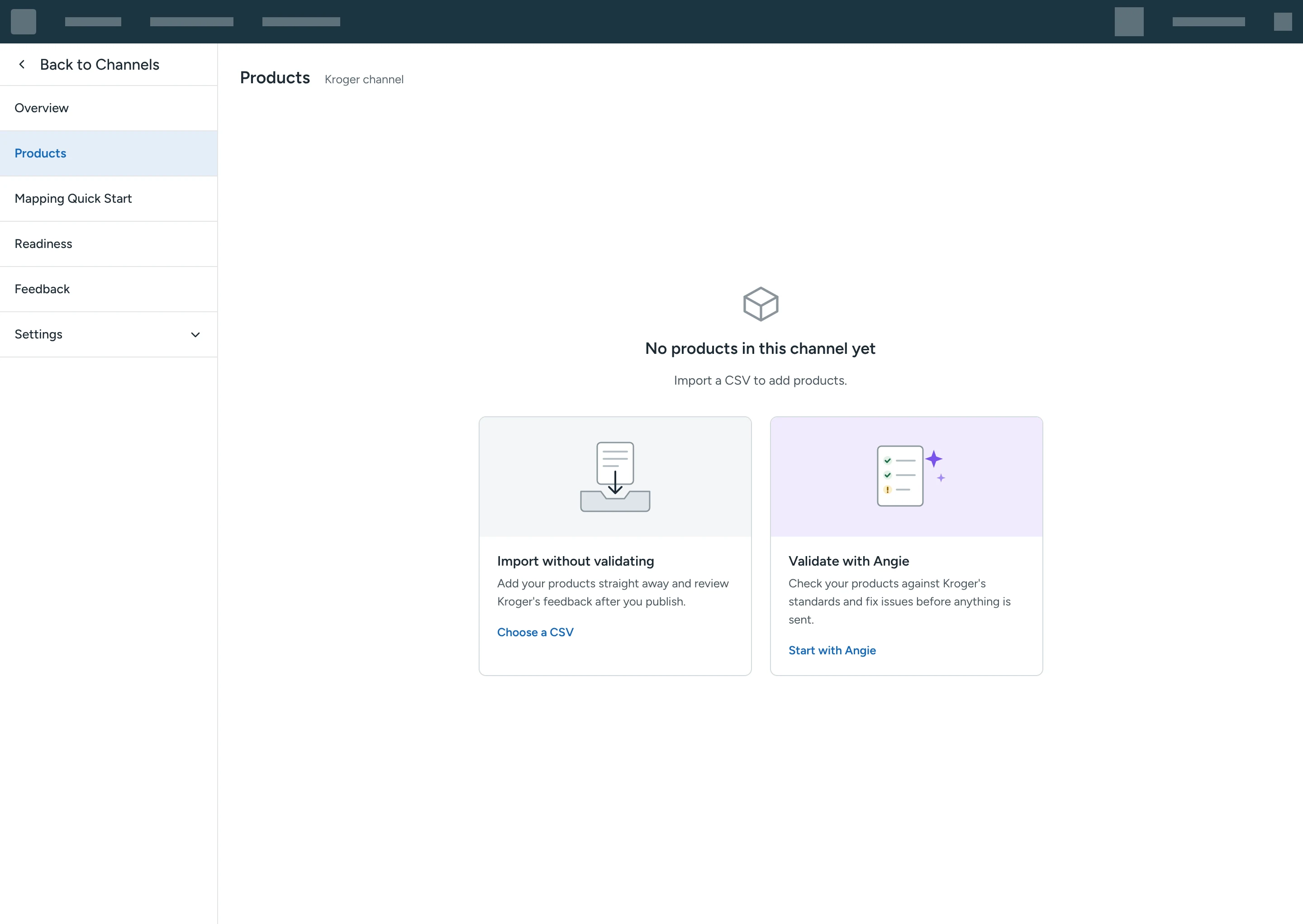
On an empty Products page, customers choose between importing a CSV straight away and validating it with Angie first. Both options carry equal weight, so the choice stays with the customer.
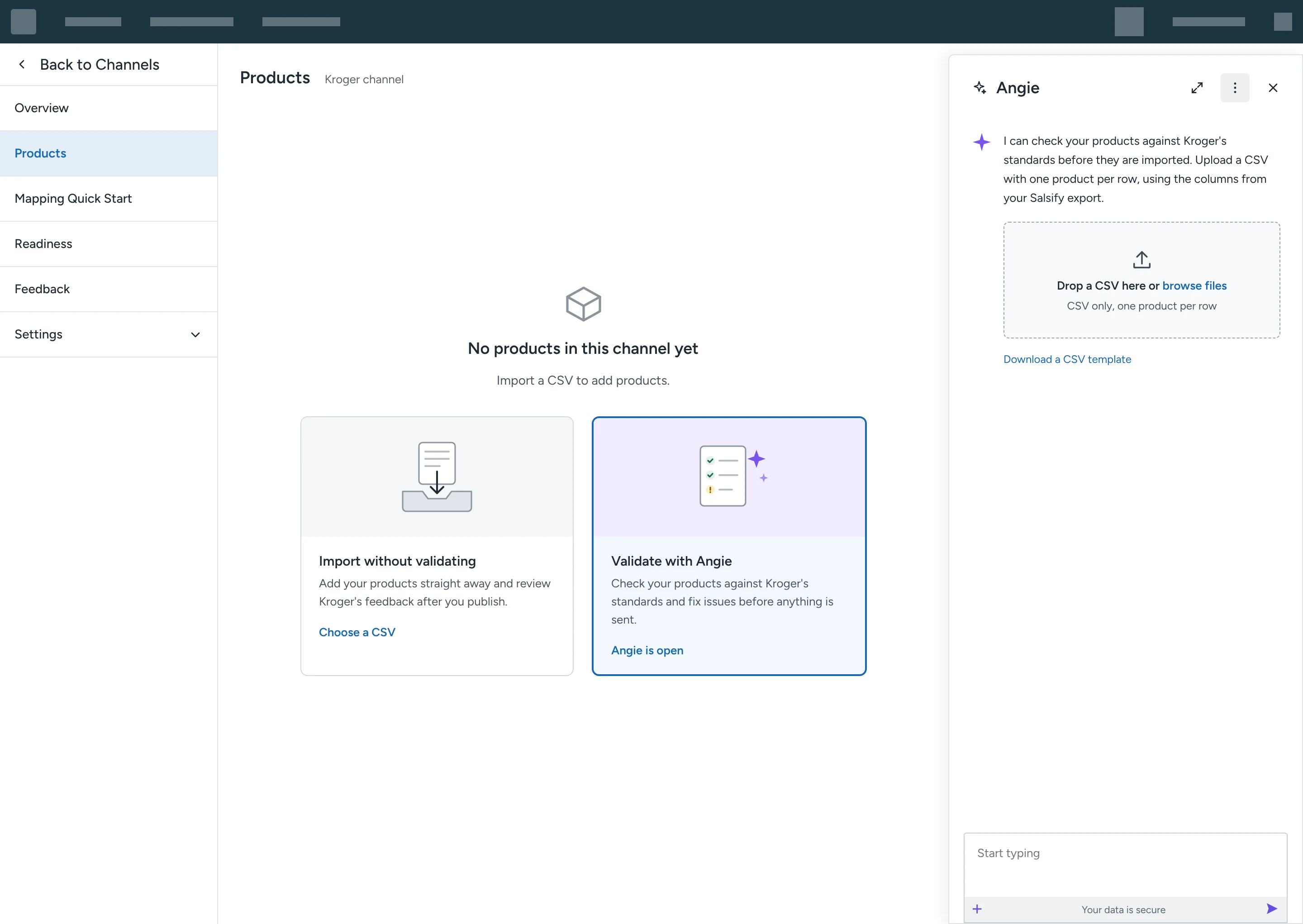
Choosing Validate with Angie opens the Angie panel, which asks for the CSV.
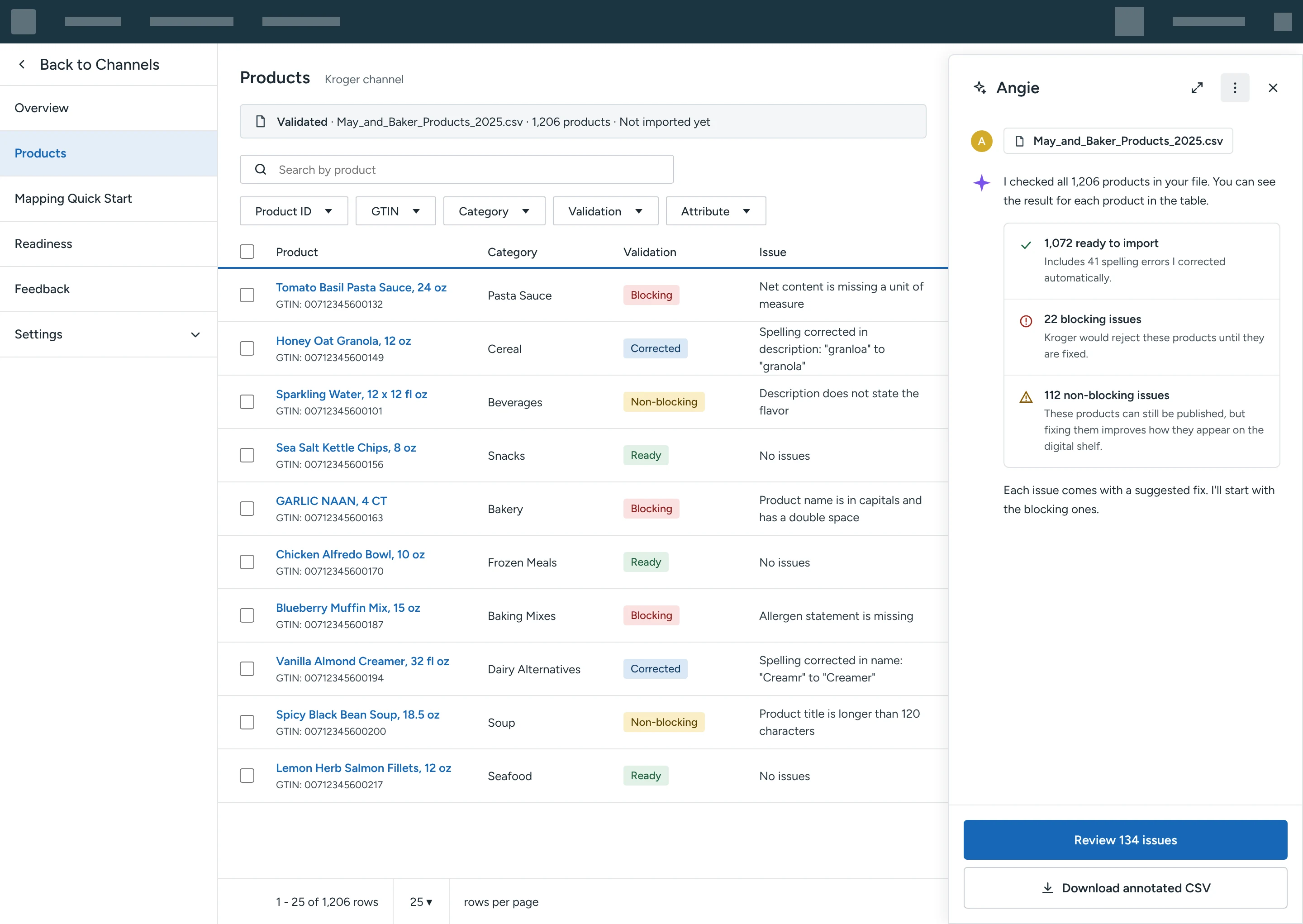
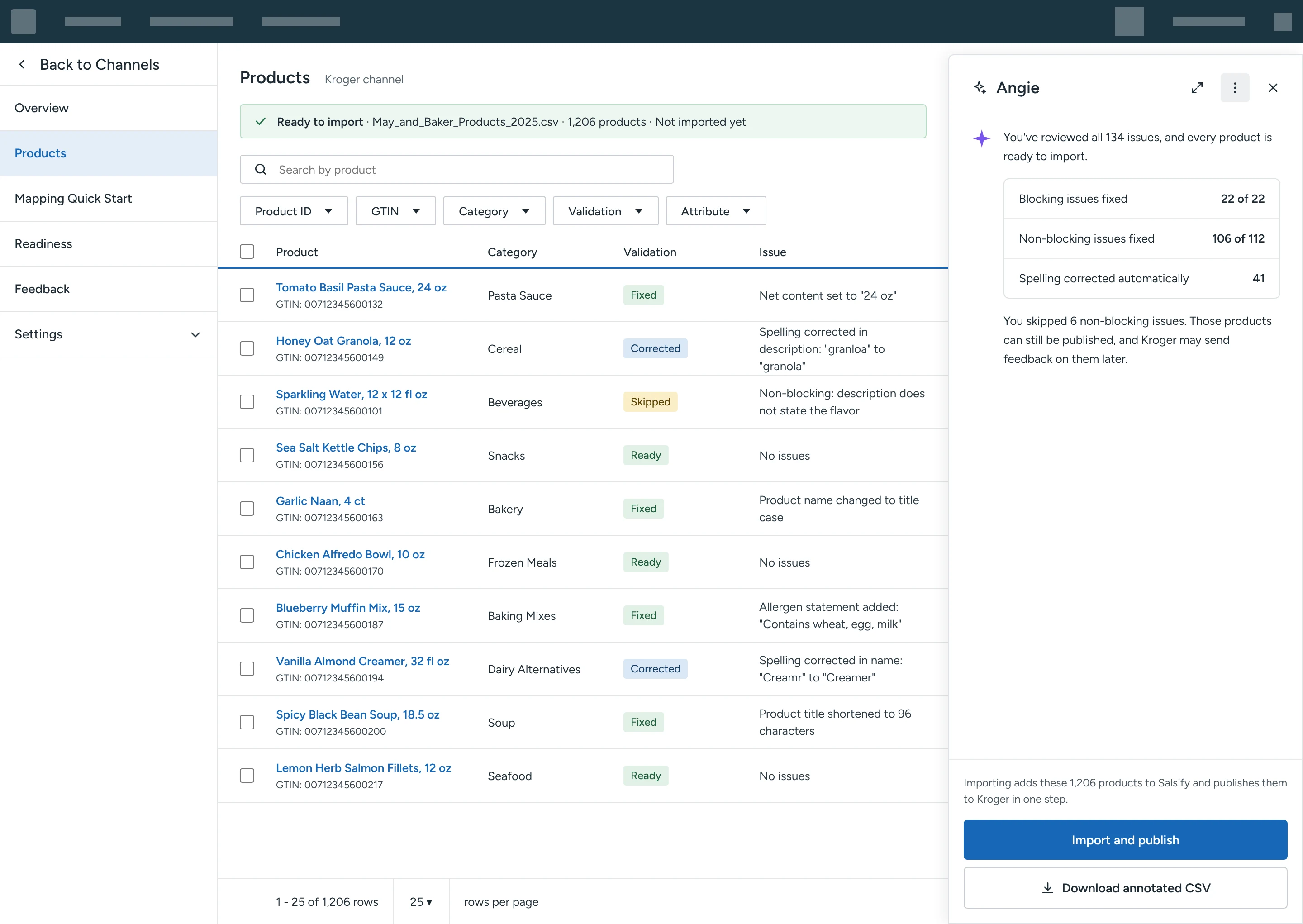
Angie checks every product and returns a summary in the panel, while the table shows the result for each product: ready, corrected automatically, blocking or non-blocking.
Customers then review the issues one at a time, starting with the blocking ones. Each issue shows the attribute, the current value and a suggested fix, along with where the suggestion came from.
Once the review is complete, customers can import the products and publish them to Kroger in one step, or download an annotated CSV. Any non-blocking issues the customer skipped are listed in the summary.
Working with Kroger's feedback after publishing
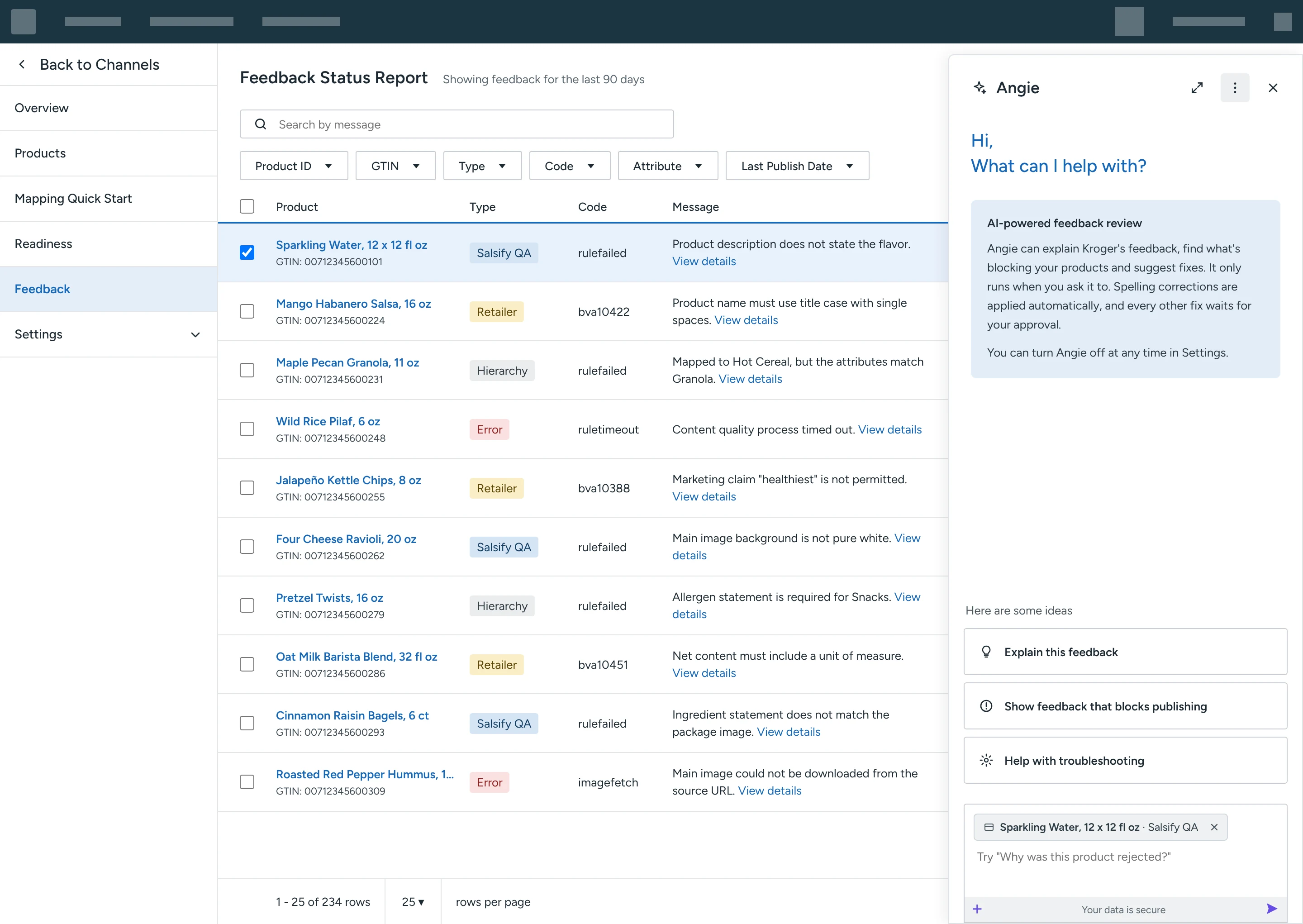
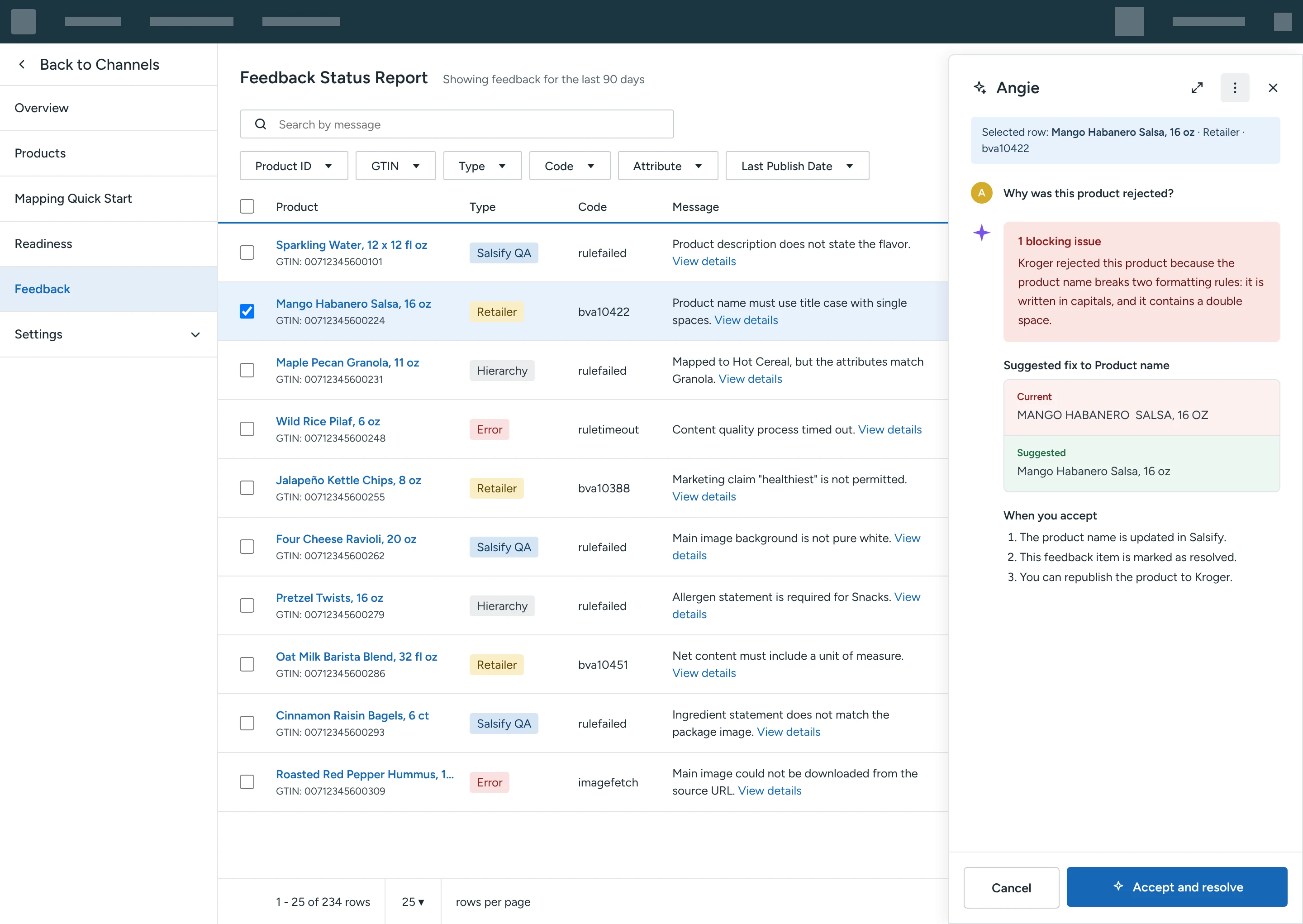
On the Feedback Status Report, the Angie panel opens with starting points that relate to the selected row. The selected row appears as a removable chip in the message input, so customers can see what Angie will look at.
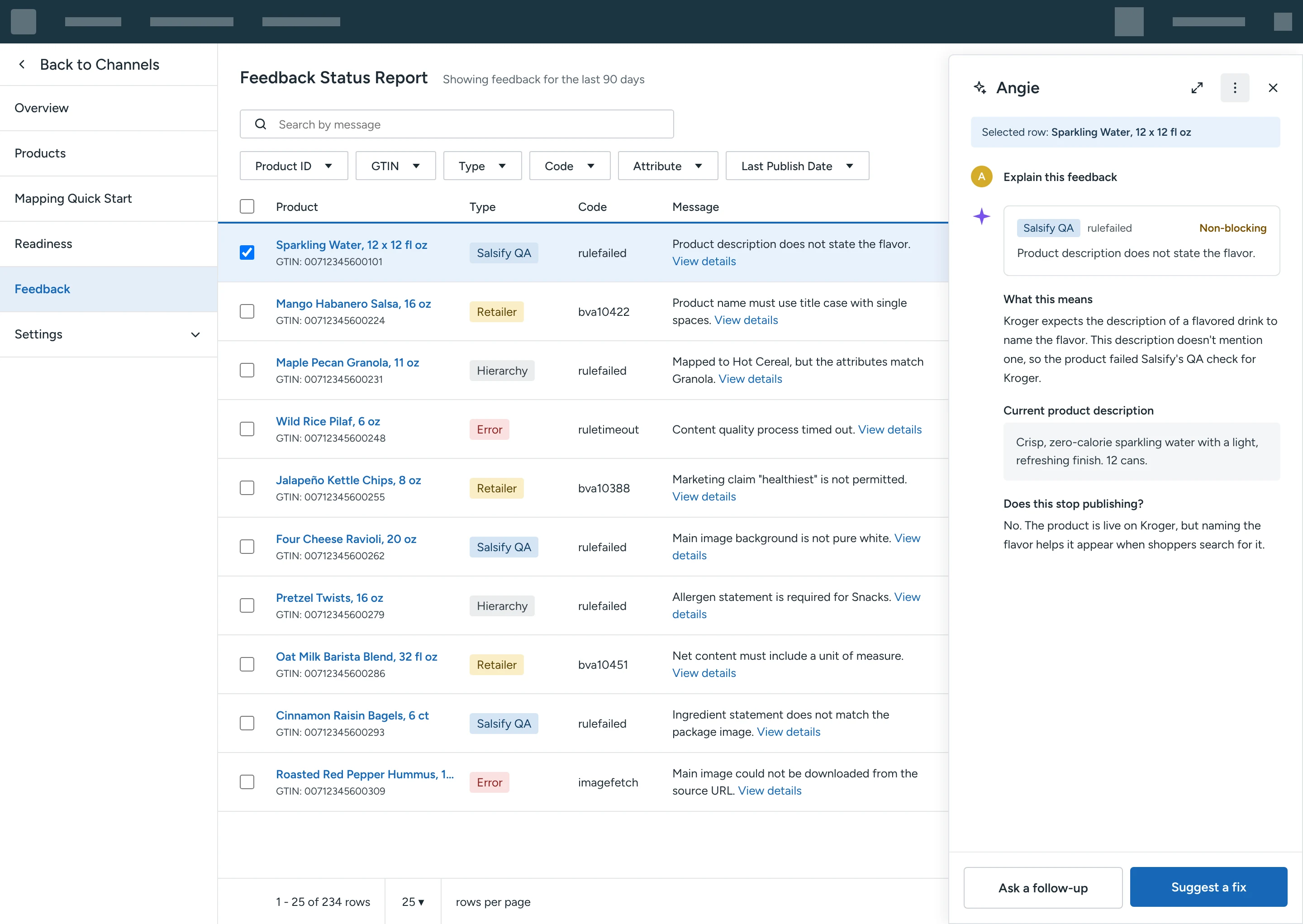
Explain this feedback restates the item, explains what it means and says whether it blocks publishing.
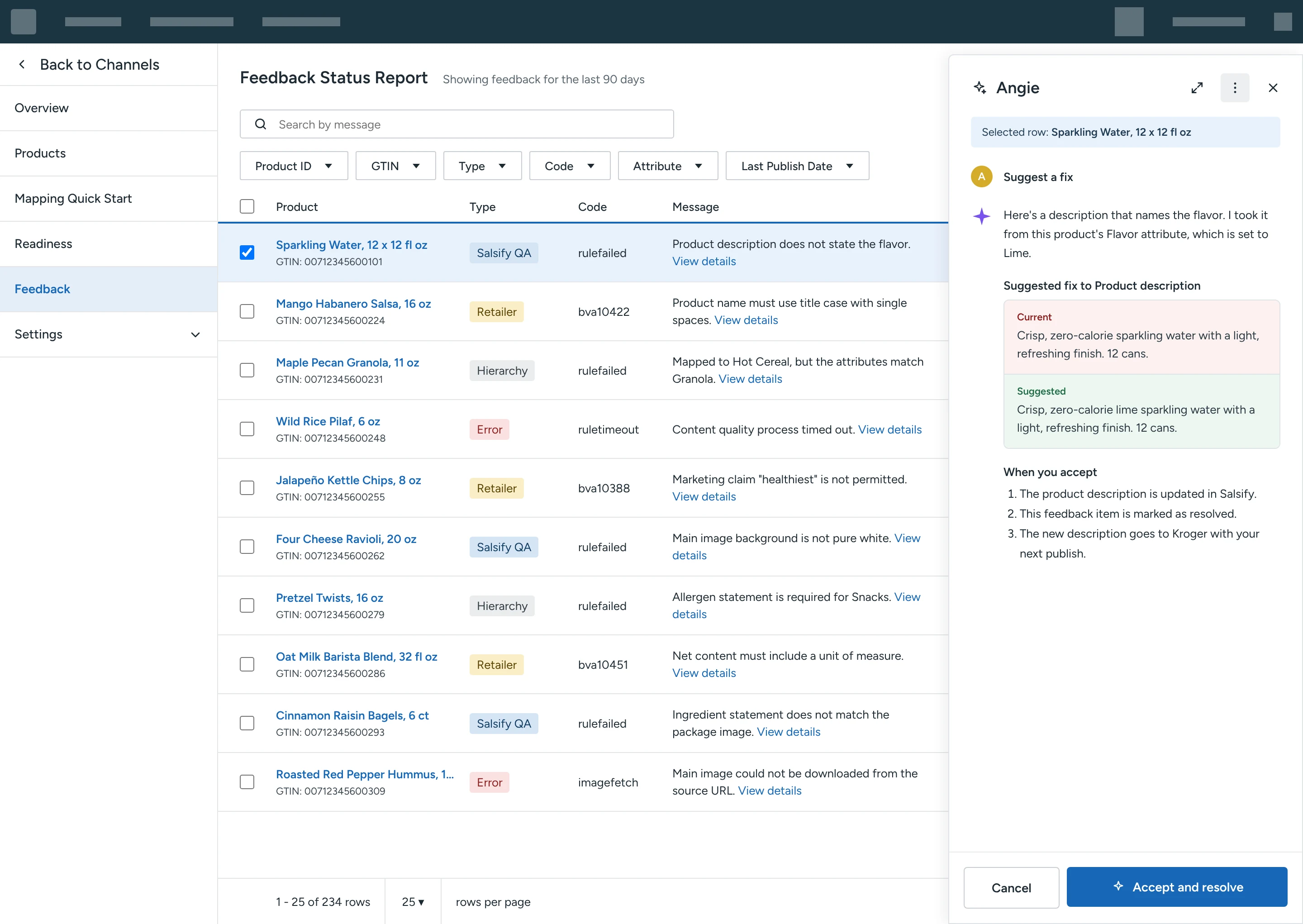
Suggest a fix proposes a change based on the product's own attributes, shows the current and suggested values side by side, and explains what happens when the customer accepts it.
For a rejected product, Angie identifies the blocking issue, proposes a fix and explains the steps to get the product back to Kroger.
Outcome
The flow reduced manual review load by approximately 93%.
The AI Feedback Report flow reviews product content that customers publish to Kroger through Salsify, and manual review load fell by approximately 93%. Salsify also referenced the work in its article on product content quality with Kroger and Grainger.