Journal · 8 min read
Why does AI keep missing what you actually meant?
You write a thorough prompt, the output is competent but not quite right, and you iterate without knowing why. The gap has a name, and closing it takes one sentence.
There is a specific frustration that anyone working regularly with AI will recognise, even if they have never quite named it. You write what feels like a thorough prompt. You have included the context, the constraints, the goal. You hit enter with reasonable confidence. The output comes back and it is... fine. Competent. But it is not quite what you had in mind, and the gap between what came back and what you actually wanted is hard to explain. You try again, adjusting the prompt. You still get close but not quite there. After three iterations you are not sure if the problem is the AI or you.
The problem, most of the time, is a gap between what you think you communicated and what the AI actually had to work with. I have started calling this the context gap, and closing it is both simpler and more revealing than most people expect.
The reason the context gap exists is structural. When you communicate a brief to a human colleague, the colleague is continuously filling in gaps from their own experience, asking questions when something does not add up, and flagging assumptions that might not hold. This is especially true of senior colleagues, who have accumulated enough judgment to know which gaps are load-bearing and which ones are not. A senior engineer reading a requirements doc will push back on something that seems inconsistent. A senior designer presented with a brief they do not fully understand will say so rather than guess. A junior, working with less experience and often less authority to question a superior, tends to absorb the brief and execute as literally as possible, even when a question or two would have produced a much better result.
AI, in most contexts, behaves like the junior. It takes what you give it and does its best with it, without volunteering what it did not understand or what it assumed along the way. This is not a flaw exactly; it is a consequence of how the interaction is structured. The AI is waiting for you to lead, and if you do not invite it to ask questions, it will not.
What changes when you invite AI to ask first.
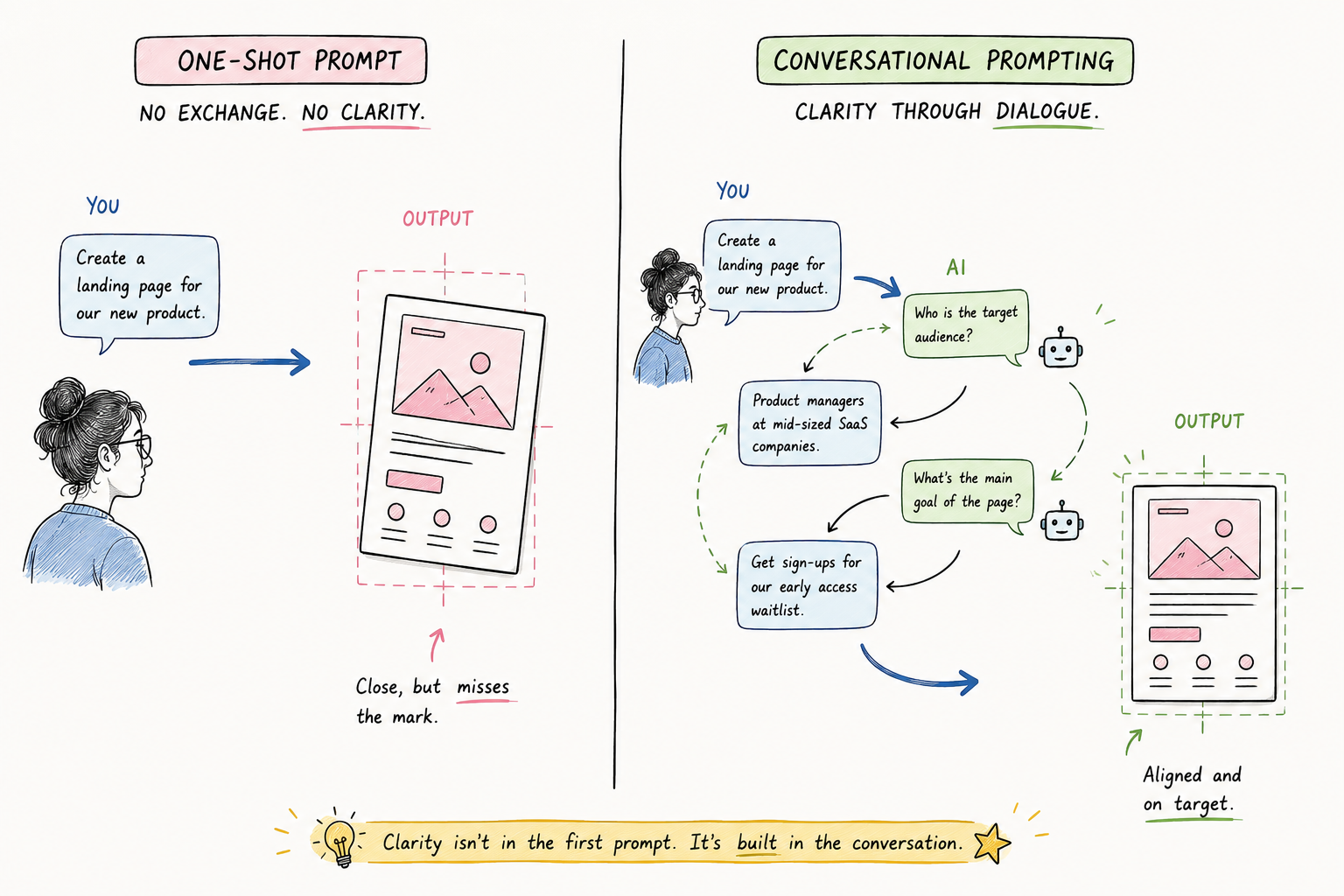
The fix is almost embarrassingly simple. Instead of sending your prompt and waiting for output, you send your prompt and add a line at the end: "ask me any questions you need before you start." That is it. The change in output quality is sometimes immediate and always instructive.
To see it clearly, run the experiment yourself. Open two fresh AI sessions, incognito mode works well if you want to keep them genuinely isolated. In the first, give the AI your usual prompt and send it. In the second, give the AI the same prompt and add the invitation to ask questions. Compare the questions the AI generates in the second session against the output it produced in the first. Almost every time, the questions will surface something the first output got wrong, assumed away, or glossed over.
This works because the context gap runs in both directions. The AI does not ask because you have not invited it to, but you also often do not know the gap exists until you see the question that reveals it. The question "should the onboarding flow be a full-screen guided experience or something the user can return to later?" is not one you would necessarily have thought to specify, until an AI asks it and you realise the answer matters quite a lot to what you are building.
What the questions actually tell you.
Beyond the immediate improvement in output quality, the questions that come back in the second session carry real information of their own, and it is worth paying attention to them separately from whatever the AI ends up producing.
First, they show you the blind spots in your brief. Not vagueness in a general sense, but specific places where the brief underspecified something the AI needed in order to make a decision. Those are the same places your teammates will have questions when you present the work. Getting them surfaced by an AI at 9am means you are prepared for the design review at 3pm in a way that would have otherwise required a dry run.
Second, they calibrate how well you communicate. Most of us believe we are more succinct and clear than we actually are. Seeing an AI ask three questions about a single paragraph of context is useful in the way a slightly uncomfortable code review is useful: it shows you where the logic was not as legible as it felt when you wrote it.
Third, if you are working on the same project across multiple AI sessions, the questions that recur tend to cluster around the same few unresolved decisions. Tracking those questions is effectively a live FAQ for the project. After four or five sessions, you will start to see which parts of the brief are genuinely settled and which ones are ambiguous enough that even an AI cannot resolve them without asking. Those recurring questions are usually the sign of a team decision that needs to be made explicit before any design work can fully resolve.
How this reshapes a real design workflow.
The context gap shows up most vividly when you are using AI to prototype. Imagine you are designing a SaaS onboarding screen and you hand the brief to Claude or whichever tool your team uses. Without the invitation to ask questions, the AI will make decisions about the onboarding flow on your behalf, deciding what steps to include, whether the experience is linear or branching, how it handles users who do not complete it in one session. Those decisions get embedded in the prototype and you might not notice them until someone in the design review points out that the assumed pattern does not match what the product team agreed on six weeks ago.
With the invitation, the AI asks those questions first. Should onboarding be a full-screen guided flow or a lightweight sidebar the user can dismiss and return to? What happens when someone signs up but does not complete the setup? Are there account tiers that change what onboarding needs to cover? The answers to these questions do not just improve the prototype; they surface decisions that were undecided, force them into the open, and let the team align before anything is built.
There is also a secondary effect worth naming: an AI that has asked you good questions has inadvertently prepared you for your next design review. The questions it raised are, more often than not, exactly the questions your PM or EM will raise when they see the work. By the time you get to that review, you have already thought them through. The work lands better because the context gap closed before the prototype was made, not after.
The habit scales past design work. Whenever you are prompting AI on anything of real complexity, the question-first approach produces a better outcome than the brief-and-hope approach, because the questions surface what the brief assumed without saying so. It takes two minutes to invite the questions. It saves more than two minutes on every piece of revision you would otherwise need.
One counterargument, resolved.
The obvious pushback here is that better-written prompts should solve this directly. If you provide enough context up front, the AI will not need to ask questions, and the output should be right the first time. This is true, and prompt engineering is a real skill worth developing. But it does not fully close the context gap, for two reasons.
The first is that you often do not know which context is missing until you see the gap in the output. The context gap is invisible from the inside. Writing a more detailed prompt addresses the gaps you already know about; it does not surface the ones you do not. An AI that asks questions surfaces those gaps for you, which makes you a better briefer over time, not a more dependent one.
The second is that the context gap is not fixed; it shifts with the project. A detailed prompt that worked perfectly last week may underspecify something that became important this week because the scope changed. The habit of inviting questions is more durable than the habit of writing long prompts because it adapts automatically, without requiring you to anticipate every way the brief might be incomplete before you start.
FAQ
Frequently asked questions
- What is the context gap in AI prompting?
- The context gap is the distance between what you think you communicated in a prompt and what the AI actually had to work with. It exists because AI, like a junior colleague, executes on the brief it receives without surfacing what it assumed or did not understand, unless you explicitly invite it to ask questions.
- Why does AI not ask clarifying questions automatically?
- Because the interaction is structured around you leading and the AI following. Without an explicit invitation to ask, AI treats the prompt as complete and produces its best output from what it has. Adding "ask me any questions you need before you start" at the end of your prompt changes the dynamic entirely.
- Does inviting AI to ask questions slow down the workflow?
- Slightly at the start. But the time spent answering three or four targeted questions before the AI begins is almost always less than the time spent iterating on output that missed the mark. For anything of real complexity, the net effect on total time is positive.
- How is inviting questions different from just writing a better prompt?
- A better prompt closes gaps you already know about. The context gap includes gaps you do not know about until they surface. Inviting questions reveals both. Over time, the questions AI asks will make you a more thorough briefer because you start anticipating them before you even open a new session.
- What should I do with the questions AI asks?
- Answer them, use the answers to improve the output, and keep a running list of the questions that recur across sessions. Recurring questions are usually a sign of an unresolved team decision that needs to be made explicit, rather than a problem with the AI or with your prompting.
Stay in touch
Want to keep talking?
I’m on LinkedIn. Connect, send questions, or just lurk. All welcome.