Astro · 2026 · Expert network · Agentic AI
Earning trust in an AI agent that sources and matches experts to projects.
An AI agent that sources experts for research projects and explains every match against the client’s requirements, so a high-pressure team can trust its shortlists and decide quickly.
- Sole
- Designer
- 1st
- Agentic feature at the company
- 2026
- In production
- Role
- Lead Product Designer · Sole designer
- Team
- Design + 2 PMs + engineering leadership, front-end and AI engineers
- Tags
- Agentic AI · Conversational UX · Trust in AI
The first fully agentic feature at an expert network, designed to source experts, match them to each project's requirements and make its reasoning visible enough to earn the trust of the people reviewing its results. Product name and company are withheld for privacy, and screens are recreated.
The problem
The client services team judges many expert profiles a day, under pressure.
In an expert network, the client services team sources experts for each client project, often from beyond the firm's existing network. The team is made up of associates, project leads and managers. The role is high-pressure, the industry is highly competitive, and the team reviews many expert profiles every day, deciding quickly whether each one is a fit. Astro is an AI agent that sources experts and matches them to each project's requirements, so the team can make those decisions faster and with confidence.
Scope
Astro was the company’s first fully agentic feature.
Astro runs on its own agent-first platform, separate from the main product, and connects to the company's CRM through an MCP integration so information moves between the two. It was also the first step toward agent-led workflows at the company.
As the sole designer, I owned research, user flow mapping, UX and UI design, and the conversational UX. I worked with the head of product and a senior product manager, alongside the head of engineering, the CTO, an engineering manager, a front-end engineer and an AI engineer. The conversational UX covered how the agent presents its search plan, follows up on tasks and presents its results, and where the user is invited to approve.
Research
A pioneering platform meant building mental models from scratch.
As the company's first agent-first platform, Astro had no internal precedent to learn from. Empathy mapping built an understanding of each person who would use the agent, and user story mapping broke down the jobs to be done when sourcing experts from outside the existing network. Discovery also identified the different stakeholders and how their user journeys through the experience differ. Internal workshops brought stakeholders into alignment, including a value mapping workshop I hosted.
Principles
Two principles shaped how the agent earns trust.
Comparative analysis ran in two layers. The first looked at agentic workflows in general, to set a baseline for the principles the UX should embody. The second looked at competitors solving similar problems, to identify which patterns were standard and which were best in class. These findings shaped an agentic design principles document, which I created and kept updating as the project uncovered practices worth adding to the team's design principles.
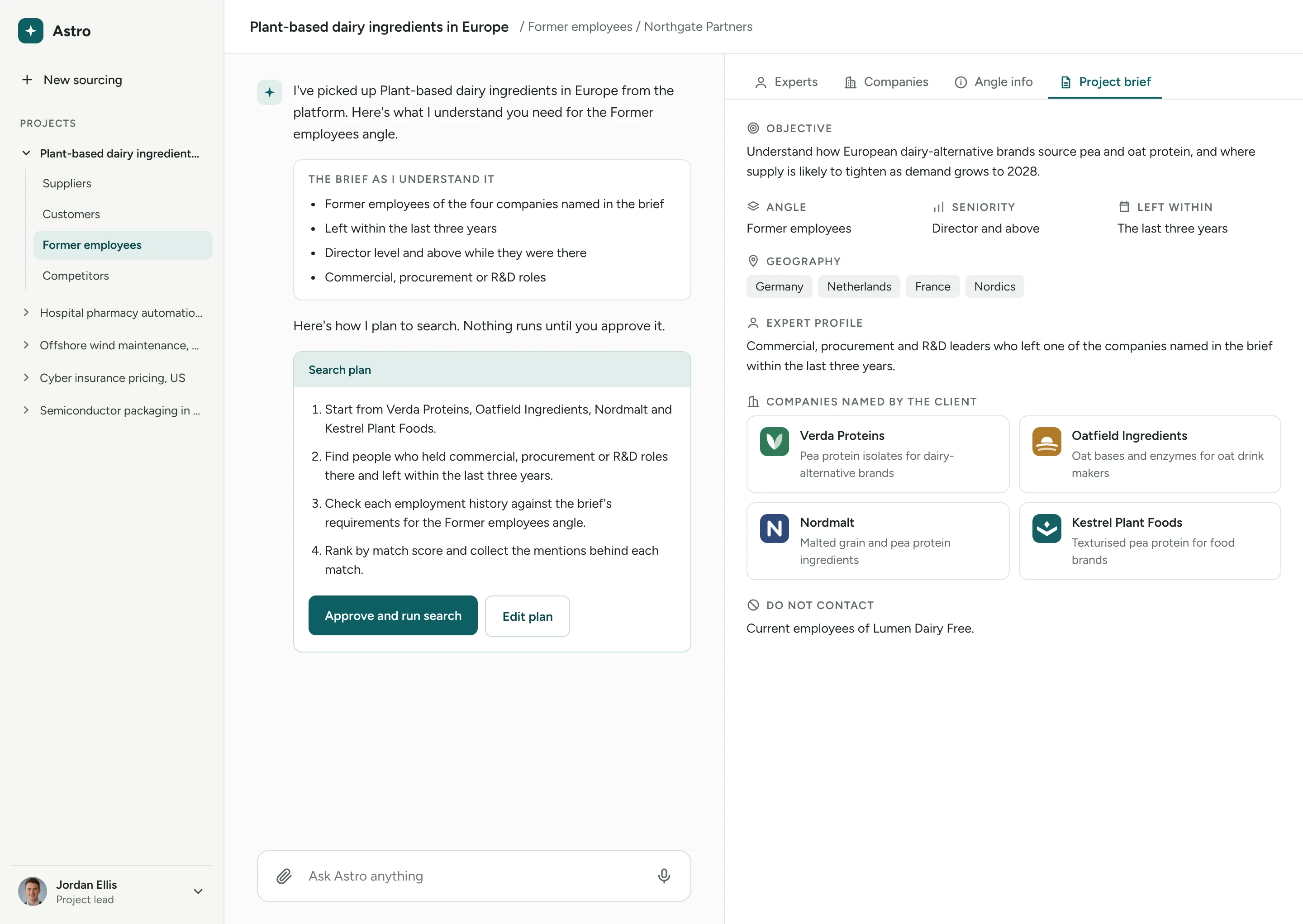
The agent's reasoning is what earns trust. People trust an agent when it shows that it understands what they want.
That understanding is built into the flow at three points. The agent restates the project brief, confirming it has internalised the requirements. It shares its search plan before acting, and it explains why each expert made the shortlist. This follows Microsoft's Guidelines for Human-AI Interaction, which ask systems to make clear why they did what they did.
The second principle is to place the human in the loop only where it counts. The user approves the search plan before the search runs, and the agent never conducts outreach to experts on its own. Each checkpoint has to earn its place, because a human in the loop can easily become a bottleneck. When an agent takes over a task but hands the person new review and oversight work, the time saved disappears.
Outreach remains an open area. Personalised outreach, where the agent tailors each message to an expert's domain and experience, was explored and deferred to a later phase.
Working from briefs
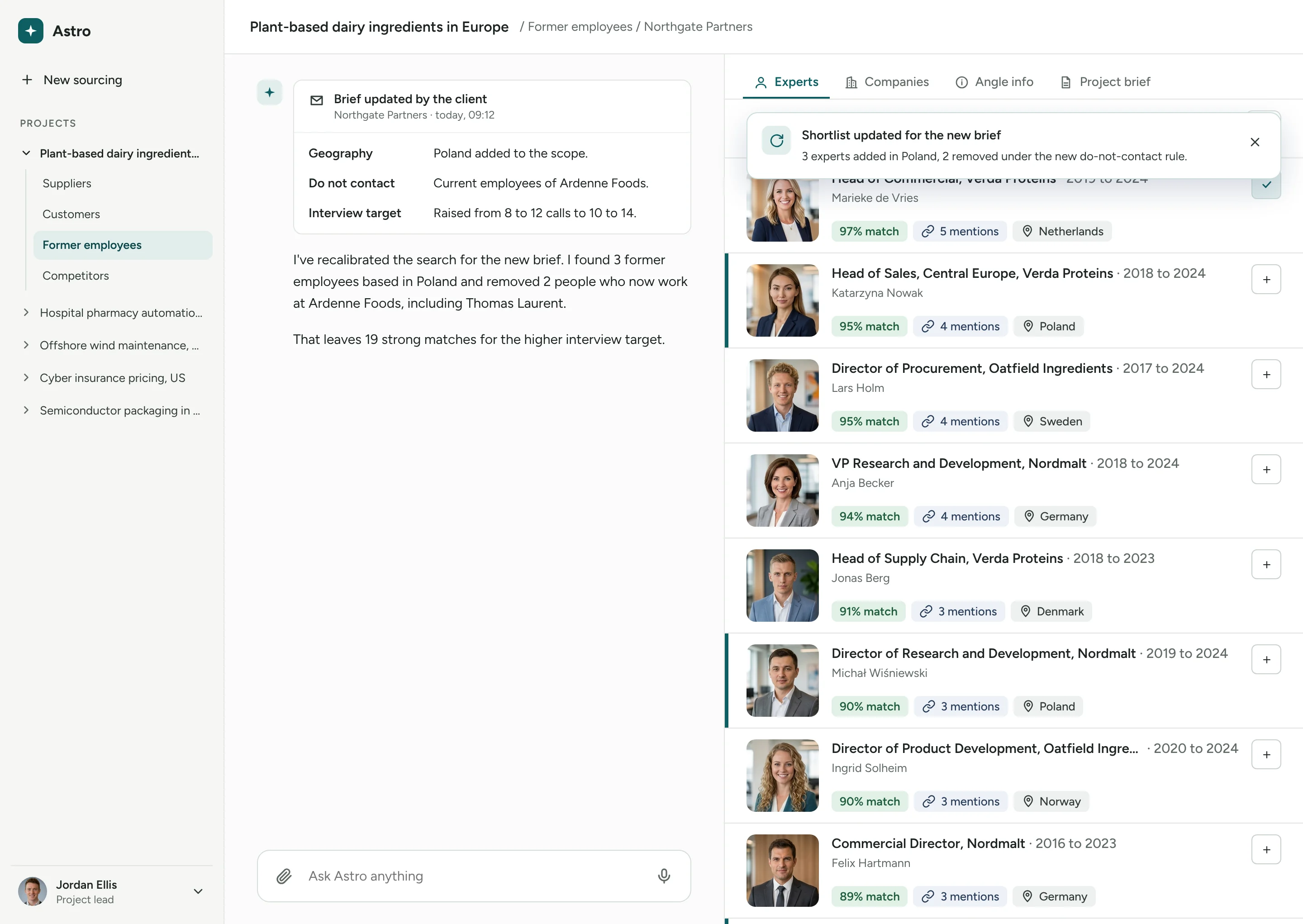
The agent works from briefs wherever they start.
Briefs reach Astro through the team's existing project intake as well as through direct requests, so the agent fits the way projects already begin. Client requirements often change within days or weeks, and when they do, Astro recalibrates its search and tells the user what has changed.
The key UX challenge
Showing why an expert is a match was the most challenging part of the project.
The moment someone sees an agent's output without knowing how it got there is the moment trust is most likely to drop.
Without visible reasoning, the client services team would face the black box problem common to AI products, and trust would drop at the point the agent most needs it.
I explored different formats, from prose to bullet points, and presented the options to the team, but what the reasoning said mattered more than its format. Each version made sense to product and engineering, yet in review rounds none fully earned the trust and credibility the client services team needed.
The turning point came when I stopped putting designs in front of the team. Instead, I asked managers and project leads to talk me through their workflow and how they judge today whether an expert is a good fit. Their mental model made the gap clear. Product and engineering had focused on evidence of the expert's expertise, such as experience and track record. The team judges fit against what the client says it is looking for. Both matter, and the reasoning needed to show them together.
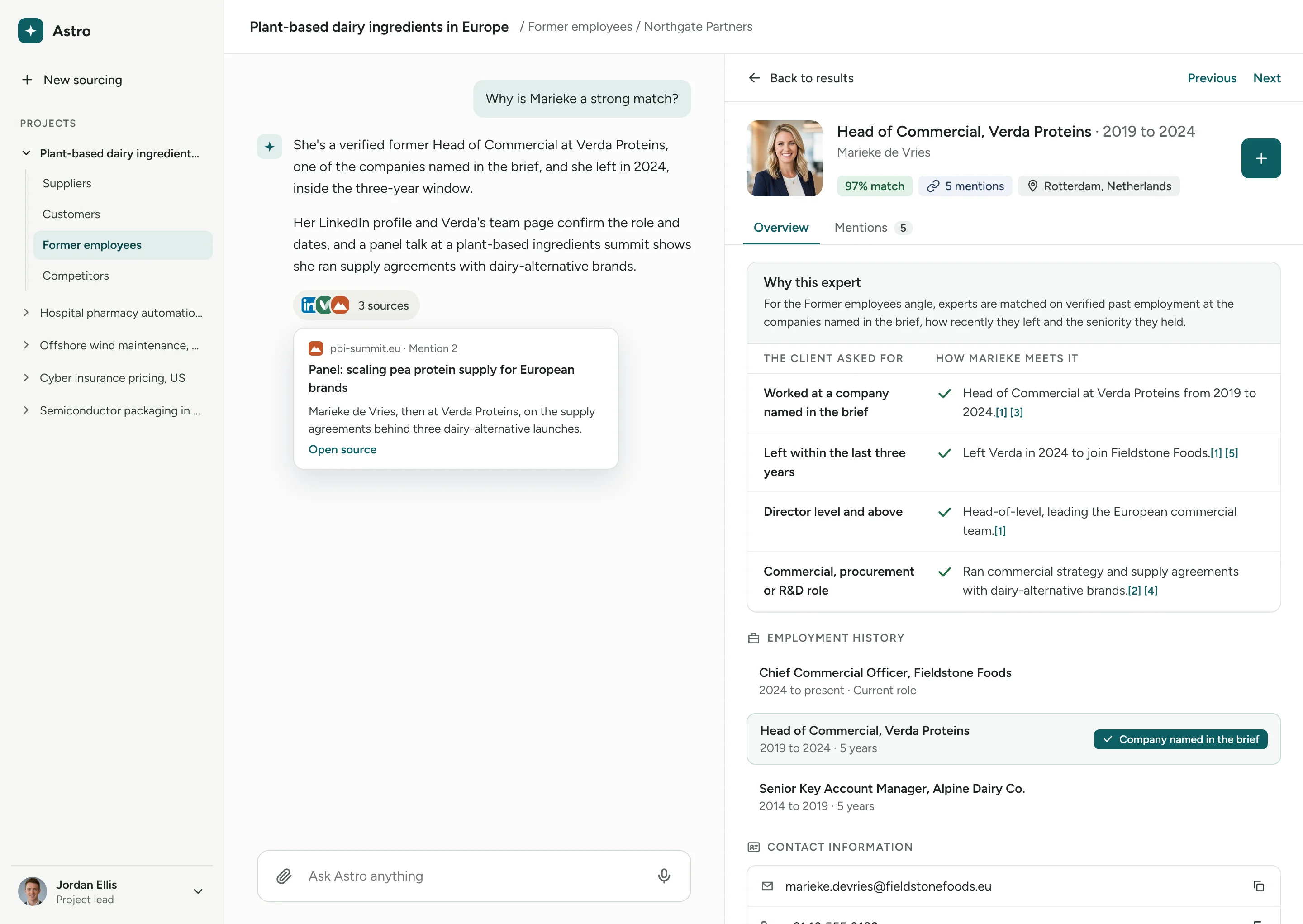
An intuitive design starts with the user's intent. The reasoning had to answer the question the team was actually asking, which is whether this expert meets this client's requirements.
The answer was a pairing logic. Each of the client's most important requirements is paired with the part of the expert's experience that meets it, so the team can see at a glance which requirements an expert meets and decide quickly.
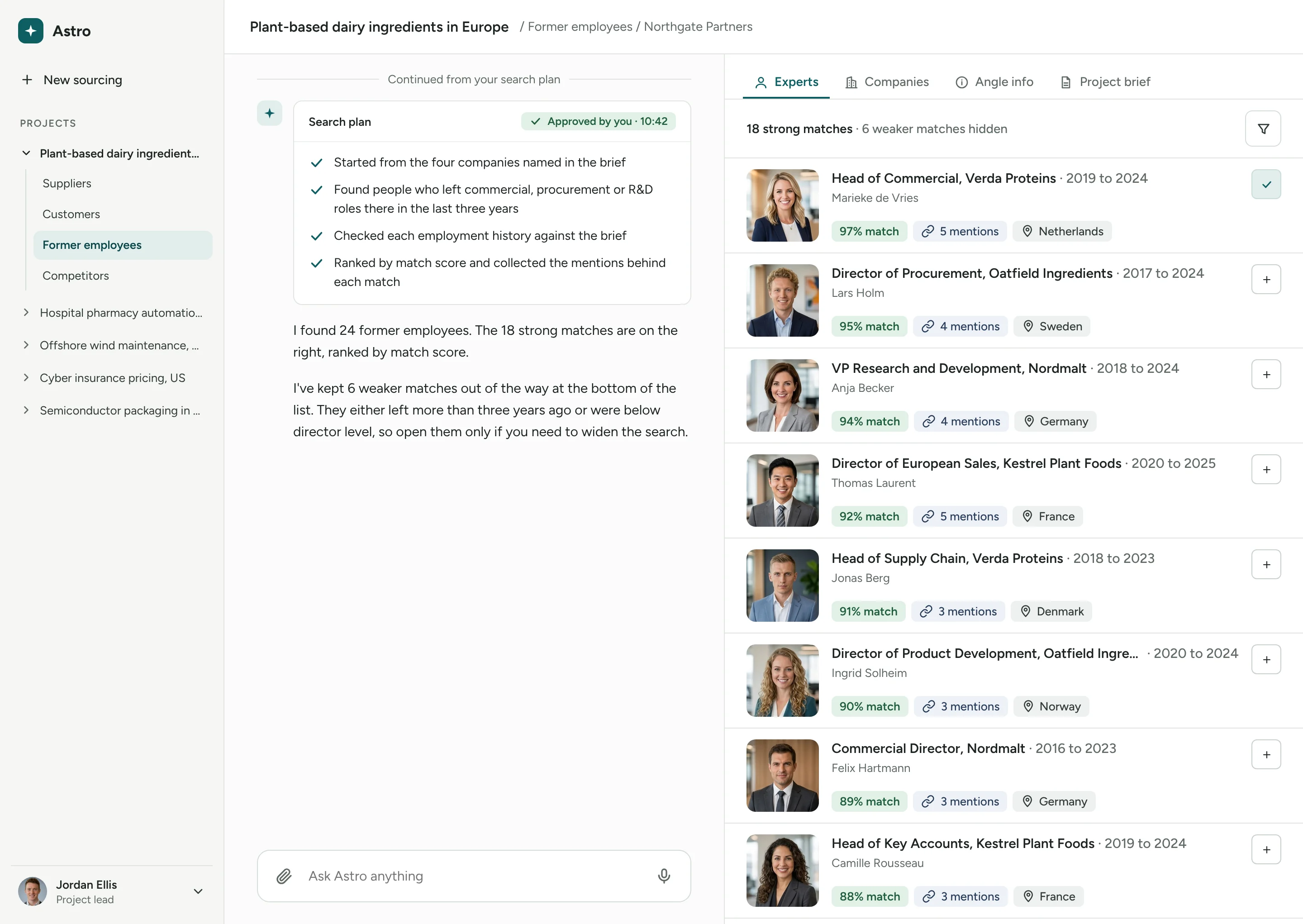
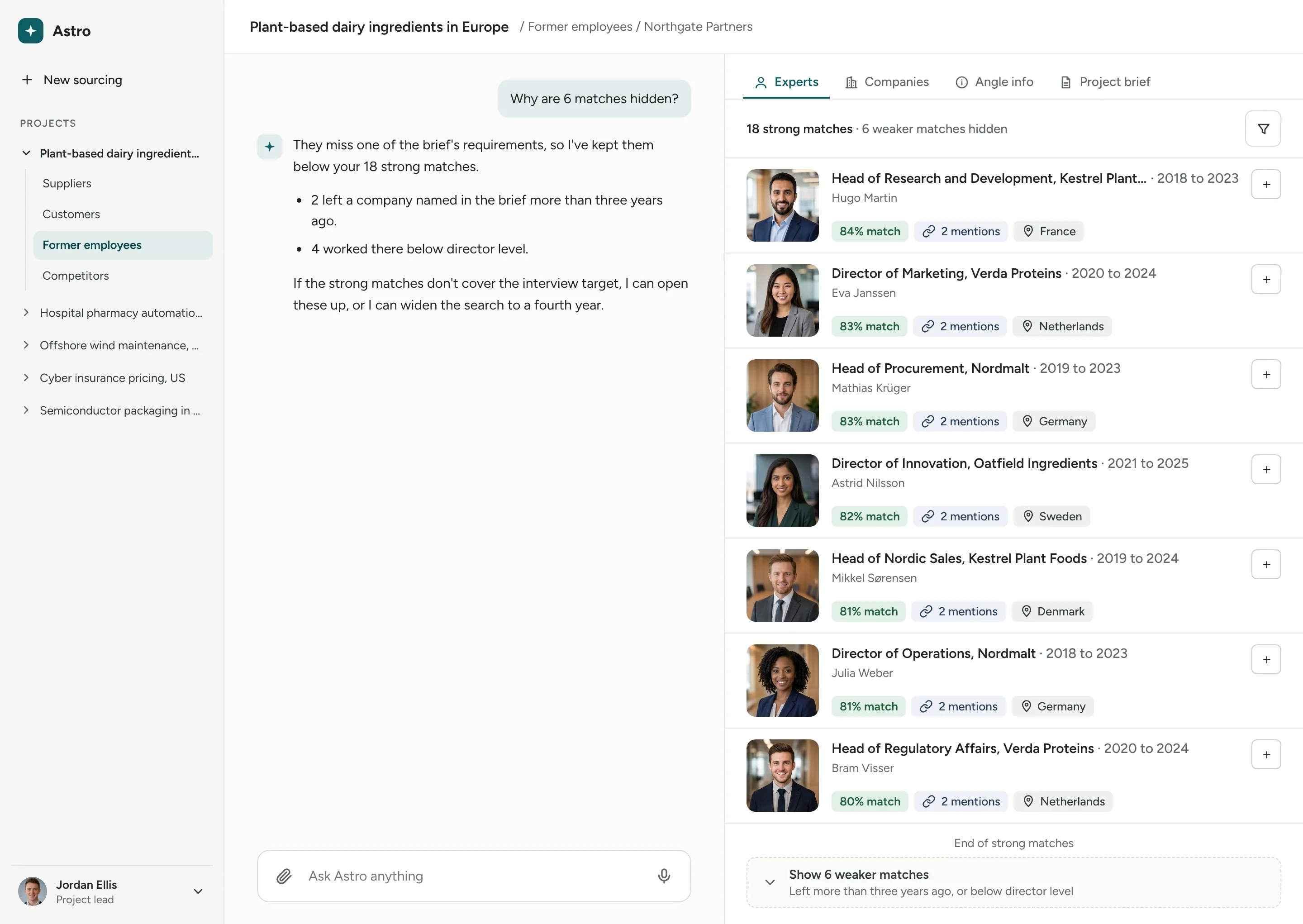
The same thinking shaped the shortlist itself. Each expert leads with their title, company and tenure, with their name in a quieter line beneath. Those three details are what the team uses to judge fit at a glance, while a name only becomes useful once an expert is worth a closer look.
Angles added another layer. In expert networking, an angle is a category of expert within a project, such as competitors of a brand, former employees or suppliers. One list of match criteria could not serve every angle, because confirming that someone is a former employee works differently from confirming they worked for a supplier or a competitor. Working through criteria across client projects, I defined match criteria for each angle type the team typically sources for.
This was the major unlock. The final review with the client services team ended with near-unanimous approval, confirming that this kind of reasoning would make them trust the agent's results.
Evidence
Mentions show how strongly each match is evidenced.
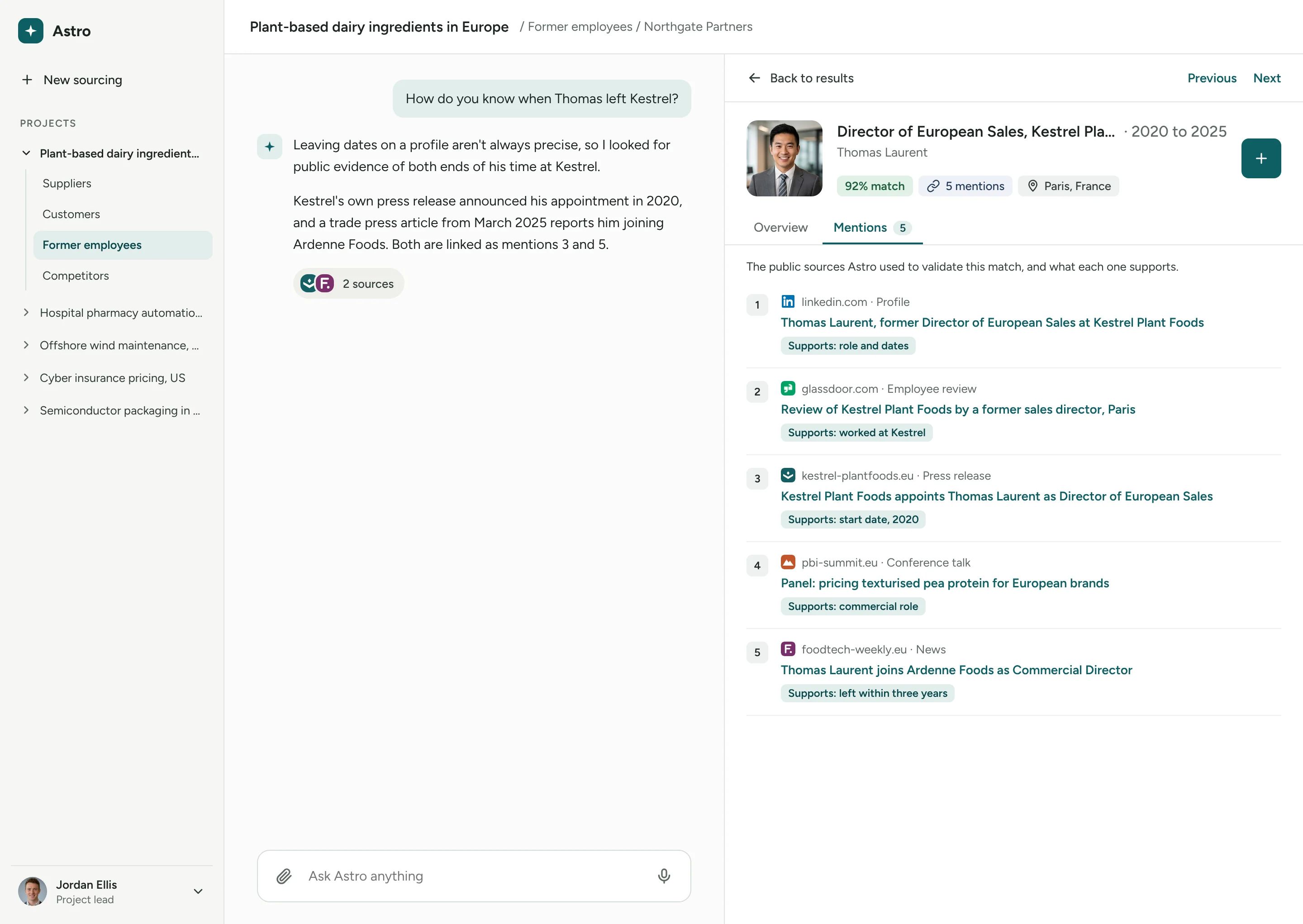
Each match carries a colour-coded match score. Strong matches score high, such as 97 percent, and show in green, while weaker matches show in amber with a correspondingly lower score. Weaker matches sit below the strong list behind a single control, so the team reviews the strongest experts first and opens the rest only when it needs more. Confidence is carried by mentions, the reference links that support each match.
User testing surfaced the need for those sources, which the team had not anticipated. The client services team wanted to see what the agent used to validate each recommendation. Sources can include white papers the expert contributed to, events they spoke at, academic journals they wrote for or contributed to, their LinkedIn profile, and a Y Combinator profile where relevant.
Public reviews matter too, because some angles are hard to prove any other way. A Glassdoor review can support a former employee match, and a Trustpilot review can support a customer match. Nobody lists being a customer of a vendor on LinkedIn, so without a review as evidence, the team can only guess from where the person worked. Gathering this kind of evidence for every candidate is also where AI sourcing goes further than manual sourcing.
Companies follow a similar rule. Companies the client named in the brief are marked as such, while companies the agent suggests have a short reason for their relevance.
Iteration
Iteration ranged from blue sky concepts to the end-to-end flow.
Building an agent-first platform was uncharted terrain, with many open questions and a lot of ambiguity, so the UX took shape through repeated design reviews and exploration. Iterations moved between Claude Code, Figma Make and Lovable, from blue sky versions to scaled-down, focused versions and the end-to-end flow. The primary users were the client services team, which made recruiting participants straightforward, and testing ran with different roles, including managers and senior associates.
Delivery
A phased release keeps the MVP measurable.
The end-to-end design was then broken into implementation milestones. The team identified what needed to be true for the MVP, focused on building it, and planned a phased release with close monitoring of how effectively the MVP moves the needle. Alongside the UX work, the team is configuring the agent to mitigate hallucinations and refining the conversational UX.
Outcome
Astro is in production and being fine-tuned.
Astro is in production and not yet released. The team is fine-tuning the agent with feedback from day-to-day use, and the most recent UX review round refined existing flows and added new ones to the MVP.