Journal · 8 min read
20 AI design terms every product designer needs to know.
AI design is producing new interaction patterns faster than it is producing names for them. Here are twenty terms to close some of that gap.
Design disciplines generate vocabulary as they mature. Visual design gave us the grid, hierarchy and the gestalt principles. UX gave us the mental model, the affordance and friction. Service design gave us the blueprint, the touchpoint and the backstage. Each of these terms gave practitioners a shared reference point, which let them argue, teach and build standards around an idea that previously had no name.
AI design is producing new interaction patterns faster than it is producing names for them. Designers working on AI products make decisions every week about things the field has not yet named, which makes those decisions harder to discuss in reviews, harder to critique consistently and harder to transfer across teams. I would call this terminology lag, meaning the gap between the point at which a new pattern becomes common enough to design against and the point at which the field develops stable vocabulary for it.
This glossary is a starting point for closing that gap. The twenty terms below are weighted toward the patterns that appear most often in AI product work and that most often lack a shared name in the teams I have seen working on them.
Some of these terms are already circulating in the industry, and I have borrowed them and tightened the definitions. Others are less settled, and the definitions here are my working versions. Where terminology is contested or still emerging, I have chosen the most useful framing rather than the most common one.
Terms for how users input and the AI responds.
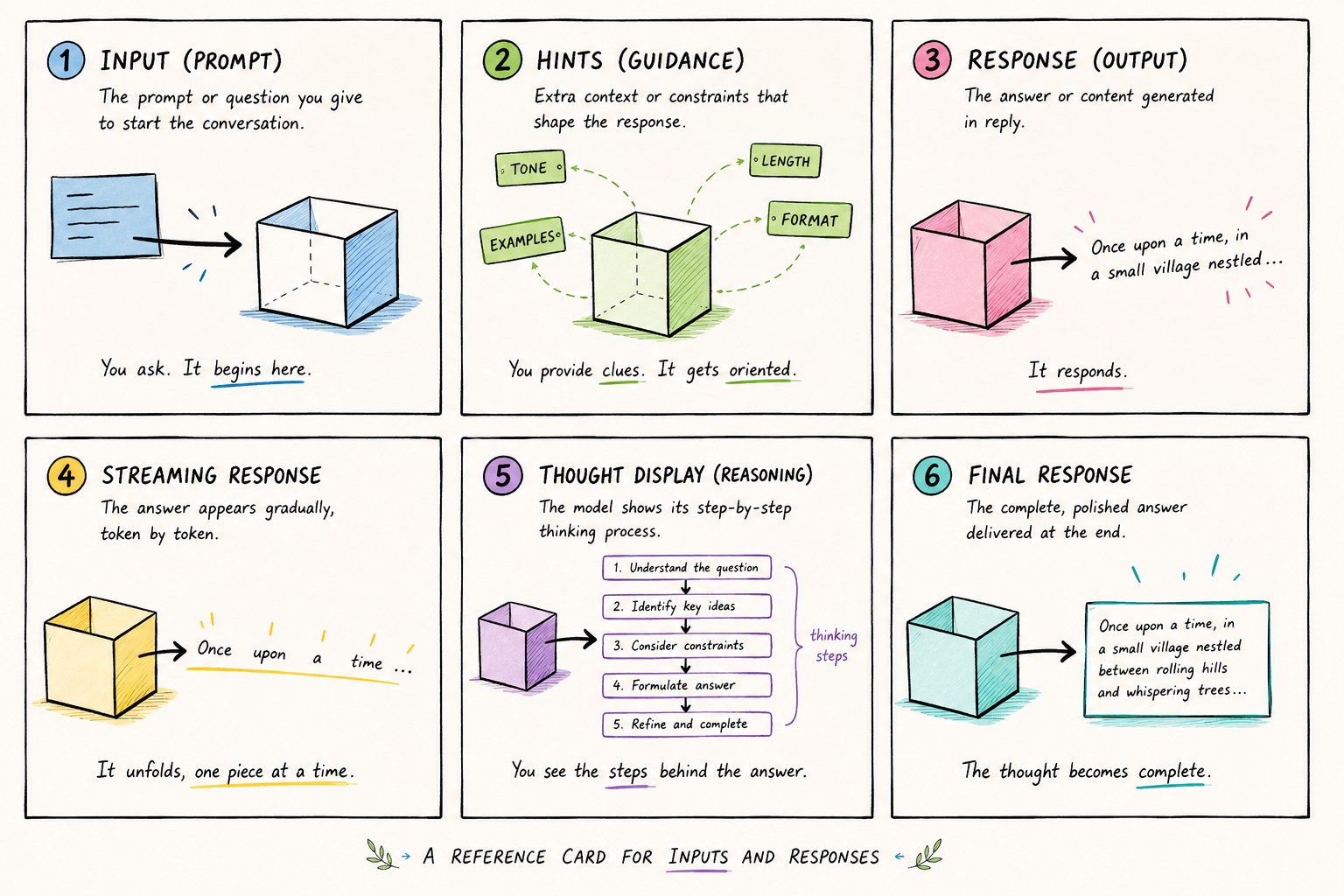
Prompt. The input a user provides to an AI system to initiate a response or action. Prompts can be conversational ("help me write this email"), instructional ("summarise the following in three bullet points") or contextual, such as a file or screenshot attached alongside a text request. Prompt design, the craft of writing and structuring prompts to get reliable, high-quality outputs, is increasingly a discipline of its own.
Summarise the attached interview notes in three bullet points for the product team.
Elicitation model. A clarification interface the AI surfaces when it needs the user to make a choice before it can proceed. Elicitation models typically present multiple-choice options rather than open text fields, because the AI has already inferred the likely range of valid responses. They differ from open follow-up questions in that the AI narrows the decision space instead of asking the user to supply information from scratch.
Who is this summary for?
Someone else
Hint chips. Short suggestion labels that appear after an AI response, offering the user a set of follow-up actions or questions. Hint chips reduce the cognitive load of knowing what to ask next and keep users moving through a workflow without having to formulate every step themselves. They also act as signposting, revealing what the AI can do without the user having to discover it through trial and error.
Here are the three themes from the interviews, ranked by how often they came up.
Streaming response. An AI output that renders incrementally as the model generates it, instead of appearing all at once when processing is complete. Streaming reduces perceived latency considerably and lets the user begin reading and evaluating the response before it finishes. It also requires decisions about in-progress states, including whether to allow interruption, how to signal that generation is ongoing and how to handle a user who wants to act on an incomplete output.
The main reason customers abandon setup is that the import step asks for data they do not have to hand. Two changes would address this. First, let customers skip the import and
Thought display. A real-time view of the AI's reasoning or working process before or alongside the final output. Streaming response shows the final output as it generates, whereas thought display shows the intermediate steps the AI takes to get there, such as which files it is reading, which sub-questions it is resolving or which tools it is invoking. Claude's extended thinking is a well-known example of thought display.
- Read Interview notes.pdf (14 pages)
- Grouped 38 quotes into recurring themes
- Checked themes against last quarter’s report
- Drafting the summary
Direct output. An AI response mode in which only the final result is presented, with no visible working process or intermediate steps. Compared with thought display, the trade-off is speed and simplicity against transparency. Users see less about how the answer was produced, which reduces cognitive load but also gives them less information for deciding whether to trust it.
Three themes came up most often in the interviews:
- Setup takes longer than customers expect
- Imported data needs manual clean-up
- Teams are unsure who owns the final review
Terms for how AI behaves and where it fails.
Hallucination. AI-generated output that is plausible in form and confident in tone but factually incorrect. Hallucinations occur because language models generate text by predicting probable continuations of patterns, rather than by retrieving verified facts from a fixed knowledge base. From a design perspective, hallucination is a limit state to design for explicitly, and the useful question is what happens to the user experience when the AI gets something wrong.
The onboarding redesign shipped in March, and activation rose by 42% in the first month.
Confidence signal. A visual or textual indicator of how certain an AI is about a given output. Confidence signals range from explicit, such as a percentage score or a "low confidence" label, to implicit, such as hedging language like "I believe" or "you may want to verify". Confidence signals have a large effect on trust. Under-signalling makes AI seem more reliable than it is, while over-signalling erodes trust in every response, including the accurate ones.
Grounding. The process of connecting AI outputs to verified external sources to reduce the risk of hallucination and make claims traceable. A grounded response points to the source each assertion comes from. Retrieval-augmented generation (RAG) is the most common architectural approach to grounding. The system retrieves relevant documents before generating a response, so the output is anchored to real material instead of being generated from patterns alone.
Source attribution. The surfacing of references or citations alongside AI-generated claims, so the user can verify the basis for an assertion instead of taking it on trust. Source attribution is closely related to grounding, but it is as much a UX decision as an architectural one, covering which sources to show, how much of each source to surface and how to present them without overwhelming the response.
Most churned customers cancelled within their first two weeks1, and the most common reason given was a slow setup2.
Guardrail. A constraint built into an AI system to prevent it from producing outputs outside a defined scope, whether that scope is set by safety, legal compliance, brand standards or product relevance. Guardrails can be implemented at the model level, at the system prompt level or as a post-processing filter on outputs. From a design perspective, guardrail activation, the moment a user's request hits a constraint, is a limit state that almost always needs a designed response, because the user still needs to understand what the AI can do when it cannot do what they asked.
I can’t share another employee’s pay. I can show the salary band for your own role or explain how pay reviews work.
Terms for how AI acts in the world.
Agentic loop. A sequence of AI-initiated actions taken autonomously across multiple steps to complete a complex task, with each step informing the next. In an agentic loop, the AI makes decisions, calls tools, evaluates results and proceeds based on its own intermediate outputs, without waiting for user input between steps. Designing for agentic loops requires particular attention to transparency (what is the AI doing?), interrupt affordance (can the user stop it?) and recovery (what happens when a step fails?).
- PlanBreak the request into steps
- ActSearch the help centre
- CheckTwo articles are out of date
- NextDraft updates for both
Repeats until the task is complete or a step fails
Tool use. An AI's ability to invoke external functions, APIs or systems as part of completing a task. When an AI searches the web, runs code, reads a file or sends a calendar invite, it is using a tool. Tool use is what separates an AI that can talk about tasks from one that can perform them. From a design perspective, tool use introduces AI actions with consequences beyond the conversation, because the AI is taking actions with real-world effects that may not be reversible.
I can book the review with everyone who commented on the draft.
- Title
- Onboarding design review
- When
- Thursday, 14:00 to 14:45
- Guests
- 4 people, invites will be sent
Interrupt affordance. A UI element or interaction pattern that lets the user stop an AI mid-task before it completes. Interrupt affordance becomes critical in agentic contexts, where an AI may take a sequence of actions over a longer time horizon and the user may realise partway through that it has misunderstood the request or is heading in the wrong direction. Designing interrupt affordance well means making it visible without being alarming, and making clear whether "stop" means stop and wait, stop and undo, or stop and explain.
Now editing: Oat Milk Barista, 1 litre
Terms for how AI products are architected.
System prompt. The hidden instruction layer provided to an AI before any user interaction begins. The system prompt shapes the AI's persona, defines its scope, sets its tone, establishes constraints and provides any context the AI needs to operate in its intended role. It is typically not visible to users, but it is the primary mechanism through which a product team customises the behaviour of an underlying model. System prompt design is closely related to AI voice design but broader in scope, covering what the AI knows, what it can and cannot do and how it should handle edge cases, as well as how it sounds.
You are the billing assistant for Acme. Answer questions about plans, invoices and payments only. Keep a friendly, concise tone. If a request is out of scope, say so and point to the help centre.
Yes. Go to Plan settings and choose Annual. You’ll be charged the prorated difference today.
Context window. The maximum amount of text, or more precisely the maximum number of tokens, that an AI model can process in a single interaction. Information outside the context window is not available to the AI when it generates a response. As products grow in complexity, context window management becomes a real design constraint. What gets included in the context (conversation history, user documents, system configuration, retrieved material) and what gets cut determines what the AI can and cannot know about the current task.
Messages older than 40 turns have been summarised to make room.
Persistent memory. An AI's ability to retain information from previous conversations or sessions and apply it in future interactions. Without persistent memory, every session starts fresh and the AI has no knowledge of prior exchanges. With it, the AI can personalise responses, avoid repeating questions and maintain continuity across a longer relationship with the user. Persistent memory introduces design considerations around transparency (what does the AI remember?), control (can the user see and delete it?) and trust (how does the user know what the AI knows about them?).
- Prefers UK English spellingFrom a chat on 2 Sep
- Works on a B2B SaaS onboarding teamFrom a chat on 28 Aug
- Shares a weekly research digest on FridaysFrom a chat on 21 Aug
Terms for how the AI interface works.
Latency affordance. A UI pattern designed to manage the user's perception of waiting, and to maintain engagement, during the gap between a prompt and an AI response. Latency affordances include typing indicators, animated thinking states, skeleton screens that preview the structure of an incoming response, and partial streaming while the rest of the response loads. Well-designed latency affordances reduce perceived wait time and signal that the system is active, while poorly designed ones create anxiety or give the impression that something has gone wrong.
Response rating. A binary or scaled feedback mechanism, most commonly a thumbs-up or thumbs-down control, that lets users signal whether an AI response was helpful. Response rating data is used to improve model behaviour over time, and the control is also a trust signal in itself, because its presence tells users that their feedback matters and that the product is actively being improved. Placement, visibility and timing all affect whether users engage with it.
What went wrong?
Multi-modal input. An AI interface that accepts more than one type of input, such as text alongside an image, a voice note alongside a document, or a screenshot alongside a question. Multi-modal input expands what a user can communicate to an AI beyond what text alone can express. It also introduces a design challenge, which is presenting a single input surface that handles several input types gracefully without making the interface feel overwhelming or unclear.
Why might people drop off on this screen?
One counterargument, resolved.
The argument against a glossary like this is that premature standardisation risks locking in the wrong terms before the patterns are stable enough to name reliably. This is a real concern, and it applies to any vocabulary-building exercise in a fast-moving field. Some of the terms above will evolve, and a few may be superseded as the field develops better ones.
The alternative, letting each team invent its own local vocabulary for these patterns and never compare notes, produces a worse outcome. Shared vocabulary is what makes critique portable and standards transferable, and it helps new practitioners find their footing without rediscovering every concept from scratch. The terms above are a starting point, meant to be argued with, refined and replaced as the practice matures.
FAQ
Frequently asked questions
- What is terminology lag in AI design?
- Terminology lag is the gap between when a new interaction pattern becomes common enough to design against and when the field develops stable shared vocabulary for it. AI design is currently producing new patterns faster than it is naming them, which makes it harder to critique work consistently, transfer knowledge across teams, or build shared standards.
- What is an elicitation model in AI design?
- An elicitation model is a clarification interface the AI surfaces when it needs the user to make a choice before proceeding. It typically presents multiple-choice options rather than an open text field, because the AI has already inferred the likely range of valid responses and is narrowing the decision space rather than asking the user to supply information from scratch.
- What is the difference between streaming response and thought display?
- A streaming response renders the final output incrementally as the model generates it, so the user can begin reading before generation is complete. Thought display shows the AI's intermediate reasoning steps before or alongside the final output. Both reduce perceived latency, but thought display also increases transparency about how the answer was produced.
- What is an agentic loop?
- An agentic loop is a sequence of AI-initiated actions taken autonomously across multiple steps to complete a complex task, with each step informing the next. The AI makes decisions, calls tools, evaluates results and proceeds based on intermediate outputs, without waiting for user input between steps. Agentic loops require specific design attention to transparency, interrupt affordance and failure recovery.
- Why does shared vocabulary matter in AI design?
- Shared vocabulary is what makes design critique portable, standards transferable, and new practitioners orientable without having to rediscover every concept from scratch. When teams invent their own local names for the same patterns, knowledge stays siloed and the field matures more slowly than it should. A glossary like this is a starting point for that shared vocabulary.
Stay in touch
Want to keep talking?
I’m on LinkedIn. Connect, send questions, or just lurk. All welcome.